
CardSnacks: ecards, gift cards
Mobigram LLCLifestyle
4.87.50K Reviews
- Version
- 20260824
- Installs
- 100.00K
- Age Rating
- Teen
Screenshots
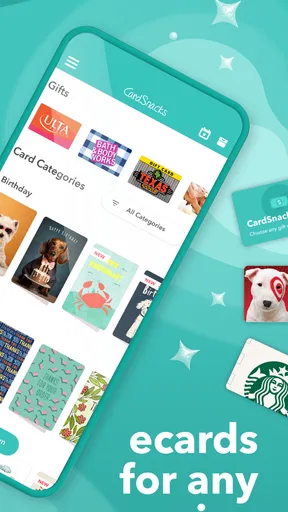
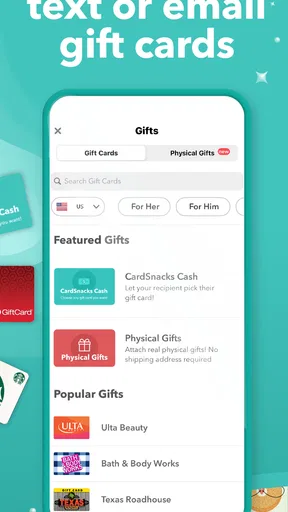
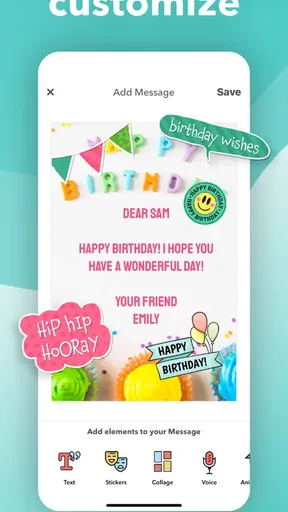
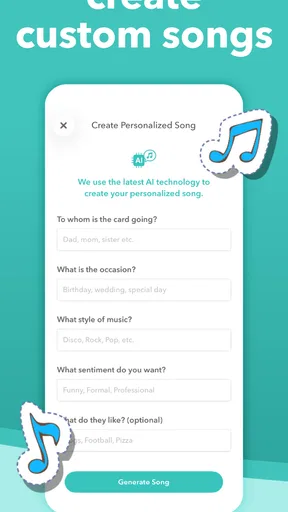
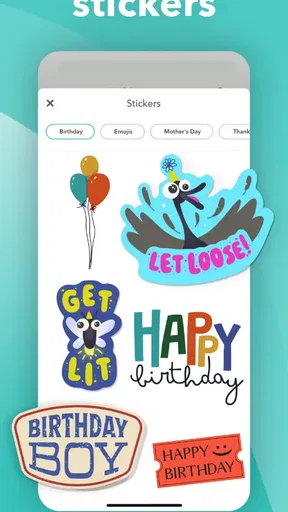
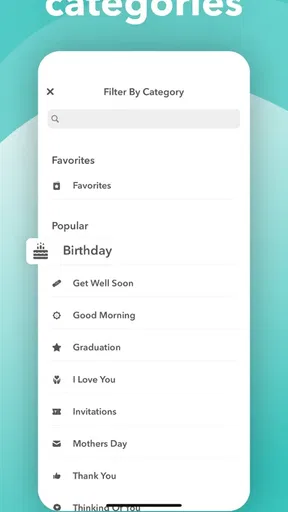

Our Review of CardSnacks: ecards, gift cards
 Analysis by Appyee
I like gifts that feel personal without turning into a full project, and that is the space CardSnacks tries to occupy. It is a lifestyle app from Mobigram LLC built around sending greeting cards and gift cards through a text message or email. That sounds simple, but the useful part is how it brings the card and the practical gift together in one sending moment. Instead of choosing a card in one place, buying something elsewhere, and then figuring out how to deliver both, I can handle the gesture from a single mobile workflow.
In my experience, the app makes the most sense when I want to acknowledge someone quickly but still show more thought than a plain “happy birthday” message. A card can carry the emotional part, while a gift card gives the recipient something useful. That combination is especially handy for birthdays, thank-you messages, congratulations, and small acts of kindness when I cannot meet someone in person.
CardSnacks is best understood as a convenient digital gifting shortcut, not a replacement for every kind of present. It is free to install, carries a Teen content rating, and works on Android devices running version ten or later. The app has reached over one hundred thousand installs, with an average rating of 4.8 from around fifteen thousand ratings, so it has clearly found an audience among people who prefer sending these gestures digitally.
Why the card-and-gift combination matters
I see the card-and-gift pairing as useful because it lets the message explain the gesture while leaving the recipient room to choose what suits them. I’d think about the person’s preferences before sending: the format works best when practical choice feels welcome, not when a carefully selected keepsake is the point. That distinction also makes it easier to decide when the convenience of sending digitally is worth relying on a network and an inbox.
A more complete gesture than a message alone
The core capability is sending a greeting card and a gift card by text or email. The effect in everyday use is that the recipient receives both recognition and choice. A normal message is immediate, but it can disappear into a busy conversation. A standalone gift card is useful, though it may feel impersonal if it arrives without any context. Pairing the two gives me a way to explain why I am sending something while still letting the other person decide how to use the practical part.
This is where the app feels more thoughtful than a basic messaging shortcut. I can use the card to add warmth, an inside reference, or a short note, while the gift card handles the part that is difficult to personalize: knowing exactly what the recipient wants. That division is valuable for relatives, coworkers, and friends whose tastes I know only partly.
It also changes the timing of gifting. I do not have to wait for shipping, remember an address, or worry about whether a physical card will arrive before the occasion. For a last-minute birthday message, a thank-you after someone helped me, or a congratulations note sent while the news is still fresh, digital delivery is the main advantage rather than a minor convenience.
Where this capability is especially useful
I found the concept strongest for occasions where the emotional value matters more than the size of the present. A small digital gesture can be enough when someone starts a new job, finishes an exam, moves house, or helps with a difficult task. In those situations, sending a card with a gift option avoids the awkwardness of overthinking the present while still making the message feel deliberate.
It can also work well for groups. If several people want to recognize a colleague or friend, one person can prepare the digital gesture and send it directly instead of coordinating a physical package. That does not turn the app into a complete group-gifting system, but it does reduce the number of separate steps involved in a simple shared idea.
There is a subtle social benefit too. A recipient can receive the message privately through a familiar channel rather than having to collect a parcel or open a public post. For people who dislike attention, that quieter delivery can make a thank-you or birthday acknowledgment more comfortable.
How I would use it without making the message feel automatic
The strongest results come from treating the card as the personal part, not as decoration around the gift. I would write one specific sentence about the person or occasion before choosing the practical item. “Thanks for covering my shift when I was stuck” feels more meaningful than a long generic greeting, because it tells the recipient that the card was selected for them rather than sent from a template out of obligation.
I would also avoid sending a card and gift card with no explanation. Even a short note about why I chose the gesture makes the delivery feel less transactional. If the recipient is someone I know well, I can mention how I hope they will use it. If I am sending it to a coworker or a newer acquaintance, I would keep the wording warm but restrained so the gift does not create pressure.
Another practical tip is to prepare the message before the deadline rather than beginning at the exact moment I remember the occasion. Digital delivery is fast, but rushing can lead to the wrong recipient, a vague note, or a card that does not match the mood. The convenience of CardSnacks is most useful when it removes logistical work, not when it encourages careless sending.
What the process feels like in practice
The basic flow is easy to understand: choose the greeting, add the gift-card element, write or adjust the message, and send it through text or email. That sequence keeps the app focused on the actual act of giving. I do not need to build a physical package or switch between a card shop and a separate gift-card service while trying to remember what I already selected.
Text delivery is the natural choice when I already communicate with the person by phone and want the gesture to appear alongside our normal conversation. Email makes more sense for professional contacts, people who prefer email, or recipients who may not want personal gifts mixed into their messaging app. Having both channels matters because the best delivery method depends as much on the relationship as on the occasion.
I would still pause before sending, especially when using email. A digital gift is only helpful if it reaches the correct address and the recipient recognizes the sender. Checking the contact details and writing a clear subject or opening message can prevent the experience from looking like an unwanted promotional message. That is not a flaw unique to this app, but it is an important part of using any digital gifting service responsibly.
The current version is listed as 20260824, which tells me the app is being maintained as an active product rather than left untouched after launch. It originally appeared on February 13, 2020, so it has had time to establish its particular approach to digital cards. I would not choose an app solely because of a version number, but continued versioning is reassuring when the whole experience depends on reliable sending.
A realistic birthday scenario
Imagine I remember on the morning of a friend’s birthday that we will not see each other that week. I could send a quick text, but that would probably be buried under other messages. With CardSnacks, I can choose a birthday card, write a note referring to our next coffee, and include a gift card so my friend can choose something useful. The message arrives through a channel they already check, while the card gives the moment a little more shape than a sentence typed between errands.
The important detail is that I am not trying to imitate a large physical present. I am using the app for a modest but intentional acknowledgment. If I wanted to send something that needs exact sizing, personal taste, or a handwritten keepsake, I would choose another method. In this scenario, speed and flexibility are the point, and the combined format fits the occasion.
Tradeoffs I noticed before relying on it
The first tradeoff is emotional texture. A digital card cannot provide the same physical experience as opening an envelope or unwrapping a carefully chosen object. For close family milestones, anniversaries, or moments where the presentation is part of the meaning, I would probably prefer a physical card or a more substantial gift. CardSnacks is strongest when convenience supports the relationship, not when convenience is expected to replace a meaningful ritual.
The second issue is choice. A gift card gives the recipient flexibility, but it also means I am not choosing a specific item for them. Some people love that freedom; others may see it as less personal. I would use the app for someone who values practical choice, and I would avoid it when I know the recipient would appreciate evidence that I searched for one particular thing.
There is also a cost consideration. The app itself is free, while in-app purchases range from $2.99 to $29.99 per item. That range makes it approachable for small gestures, but I would pay attention to the final selection rather than assuming every option has the same value. A free download does not mean every card-and-gift combination is free, so I would review the purchase details before confirming a send.
That distinction is important for families or frequent senders. If I use the app only occasionally, the convenience may easily justify the purchase. If I plan to send many gifts, I would compare the total cost with buying directly from a retailer or using a service already included in my normal shopping routine. CardSnacks saves time, but time savings should be weighed against the specific price of the chosen item.
Another limitation is dependence on digital access. The recipient needs to notice and trust the text or email, and some people are cautious about opening gift-related messages. I would introduce the message clearly and use an address or number the recipient already knows. For someone who rarely checks digital messages, a physical delivery is more dependable, even if it takes longer.
How it compares with ordinary alternatives
Compared with sending a regular text, CardSnacks adds structure and a tangible benefit. A text is faster when the goal is simply to say hello, and it is the better choice for spontaneous conversation. The app becomes worthwhile when I want the message to feel like a small event rather than another line in a chat thread.
Compared with buying a physical card, the app wins on timing and delivery. I do not need to visit a shop, find an envelope, or depend on postal timing. The physical alternative still wins for keepsakes, handwriting, and occasions where presentation matters. I see these as different tools rather than direct substitutes.
Compared with buying a gift card directly from a retailer, the app puts more attention on the greeting. A retailer may be better when I already know the exact brand, want to manage a larger purchase, or prefer to keep the card and message separate. CardSnacks is more appealing when I want one compact workflow that combines the social explanation with the practical gift.
That comparison also clarifies who should skip it. If I dislike digital cards, prefer choosing a physical object, or need a highly specific gift from a particular store, I would not force this app into the process. It is not automatically the best option just because it is quick. Its value depends on whether the combined delivery matches the relationship and the occasion.
Who gets the most value from it
I would recommend CardSnacks to busy people who still want their messages to feel intentional. It suits someone who remembers important dates late, lives away from friends or relatives, or regularly needs a small thank-you without arranging a delivery. It is also useful for people who are comfortable with text and email and want the recipient to receive the gesture without handling a physical package.
It can be a good fit for workplace relationships when the tone is kept appropriate. A concise thank-you card with a modest gift can recognize help without requiring a public announcement. I would be more careful with company policies, personal boundaries, and the value of the gift in professional settings; convenience should not override good judgment.
People who want a more personal result should spend time on the note. The app can make sending easy, but it cannot know the relationship as well as I do. The best use is not selecting the most elaborate option. It is choosing a suitable card, writing one genuine detail, and using the gift element to give the recipient freedom rather than guessing at an item.
My final take on the everyday experience
After looking at the app through that practical lens, I see CardSnacks as a focused solution for digital acknowledgment. Its strongest idea is not simply that it sends cards or gift cards; it is that both parts can travel together through a text or email. That makes a rushed gesture feel more considered, provided I add enough personal context.
The free app and Teen rating make it easy to try, while the purchase range means I should treat each send as a real buying decision rather than assuming the service is cost-free. The high average rating and substantial number of users suggest that the approach works for many people, but my recommendation would still depend on the occasion. For a quick birthday, thank-you, or long-distance surprise, I would gladly use it. For a major milestone or someone who values physical keepsakes, I would choose a traditional card or a carefully selected present instead.
My bottom line is simple: use CardSnacks when speed, personal wording, and recipient choice matter more than physical presentation. If that describes the gift I need to send, it offers a practical middle ground between a bare message and a full shopping-and-shipping project. The app does not remove the need to think about the person, but it does remove much of the friction between having that thought and turning it into a useful gesture.
Verdict
Strengths of CardSnacks: ecards, gift cards
- Wide selection of digital cards for birthdays, holidays, and everyday occasions.
- Gift card options make it easy to pair a message with a practical present.
- Personalized designs help messages feel more thoughtful than standard texts.
- Digital delivery is convenient when you need to send something at short notice.
- Useful for keeping greetings and gift choices together in one app.
Limitations of CardSnacks: ecards, gift cards
- Some premium cards and gift options may require additional payment.
- The app depends on an internet connection for browsing and sending cards.
- Gift card availability can vary by country, brand, and current promotions.
- Recipients may prefer physical cards or gifts over digital alternatives.
- Frequent notifications or promotional messages may feel intrusive to some users.
Similar Picks in This Category
View All
SmartThings
Samsung Electronics Co., Ltd.4.6

Google Home
Google LLC4.0

Pinterest4.2

Astrotalk - Talk to Astrologer
Astrology & Horoscope4.7

My Verizon
Verizon Consumer Group4.5

Samsung Wallet (Samsung Pay)
Samsung Electronics Co., Ltd.4.1
Frequently Asked Questions
What is CardSnacks: ecards, gift cards?
CardSnacks is a mobile app designed for sending digital greeting cards and gift cards from a smartphone or tablet. It combines customizable ecards with gifting options, allowing users to choose a design, add a personal message, and send it electronically. It can be useful for birthdays, holidays, thank-you notes, celebrations, and other occasions when you want to send something quickly.
Can I customize an ecard before sending it?
Yes. CardSnacks generally lets you personalize an ecard by selecting a design, writing your own message, and, depending on the card, adding names, photos, stickers, or other decorative elements. The available editing tools may vary between designs. Before sending, review the recipient details and message carefully, since mistakes in an electronic card may be difficult to correct afterward.
What types of gift cards are available in CardSnacks?
The app may provide access to digital gift cards from a selection of popular retailers, restaurants, entertainment services, and other brands. Availability can depend on your country, the current catalog, and the denomination supported by each merchant. Because gift-card choices and terms can change, check the listing inside the app before purchasing to confirm the brand, value, currency, and redemption conditions.
How are ecards and gift cards delivered to the recipient?
Delivery is typically handled digitally, which means the recipient may receive the ecard, gift card, or both through an email, text message, or another delivery method offered during checkout. You should enter the recipient’s contact information accurately and check whether immediate or scheduled delivery is selected. Some deliveries can be delayed by network issues, incorrect details, or merchant processing.
Is CardSnacks free to use, and are there any additional costs?
Downloading CardSnacks may be free, but some premium ecards, gift cards, personalization options, or in-app services can require payment. Gift cards are normally charged according to their selected value, and applicable taxes or processing fees may be shown at checkout. Review the complete order summary before confirming payment, and check the app store and merchant policies for refund or cancellation rules.
